


Windows Automation for Active Directory, MSSQL & Oracle Healthchecks
A banking client needed three critical IT management processes automated simultaneously — Active Directory stale account cleanup, MSSQL Server real-time monitoring, and Oracle database daily healthchecks. Softenger built and deployed all three as an integrated automation program using PowerShell and Shell scripting.
Three-Module Automation — Banking IT Infrastructure
Three manual processes — each a risk in a banking environment
In banking, manual IT processes aren’t just inefficient — they’re a risk category. Stale Active Directory accounts that haven’t been identified and disabled are access control failures waiting to be exploited. MSSQL Servers without real-time monitoring are reliability blind spots where performance issues become production incidents before anyone notices. Oracle databases without daily automated healthchecks are environments where degradation compounds silently over weeks before it surfaces as a critical failure.
The client had all three of these manual process risks running simultaneously. The engagement was designed to address all three in parallel — not sequentially — because the security, reliability, and database health requirements of a banking IT environment don’t wait for a phased automation roadmap.
Automate identification of stale Active Directory IDs. Build comprehensive MSSQL Server monitoring. Implement automated Oracle daily healthchecks. Replace manual, time-consuming IT management processes with automated, reliable, and proactive solutions across all three systems simultaneously.
Automating Stale ID Detection in a Large Active Directory Environment
Large AD environments accumulate dormant accounts across staff changes, contractor access, service accounts, and project-based access grants. Identifying which accounts are genuinely stale — without disrupting legitimate accounts — requires precise query logic and a reliable reporting mechanism before any cleanup action is triggered.
Active Directory · Identity Security · PowerShellBuilding Real-Time MSSQL Monitoring with Meaningful Alerts
Generic monitoring captures noise; effective monitoring captures signal. Building an MSSQL monitoring module that provides real-time insights requires selecting the right performance indicators — blocking sessions, query times, disk I/O, memory pressure — and setting alert thresholds that trigger on genuine problems, not false positives.
MSSQL Server · Performance Monitoring · Shell ScriptingCreating a Comprehensive Oracle Healthcheck That Covers the Right Metrics
Oracle database health spans performance metrics, resource utilization, and error log analysis — all of which need to be checked daily in a banking environment. The healthcheck module needed to cover all three consistently and generate automated reports that gave database owners actionable information, not raw log dumps.
Oracle Database · Healthcheck Automation · Shell + PowerShellIntegrating Three Automation Tools into a Cohesive Program
Each module used different scripting approaches for different systems. The integration challenge was ensuring that all three operated reliably in parallel — with consistent reporting formats, aligned scheduling, and no conflicts between the monitoring and healthcheck activities running concurrently on shared infrastructure.
Automation Integration · Scheduling · ConsistencyThree modules — one integrated automation program
Each module was purpose-built for its technology stack. PowerShell for Active Directory — because AD management is a native PowerShell domain. Shell scripting for MSSQL and Oracle — because both require direct server-level interactions that Shell handles with precision. All three coordinated under a single reporting and scheduling framework.
Active Directory Stale ID Identification
MSSQL Server Monitoring Module
Oracle Database Daily Healthcheck
Why three modules needed to be built as one program
Building three separate automation scripts and calling them done is not an automation program — it’s three scripts. The integration requirement was the differentiating challenge: consistent reporting formats so that output from all three modules could be consumed in the same operational workflow, aligned scheduling so that monitoring, healthcheck, and cleanup activities didn’t conflict, and a coordinated alerting approach so that banking infrastructure teams received clear, actionable notifications rather than three separate alert streams from three separate tools.
Active Directory Stale ID Identification — PowerShell automation
Dormant user accounts are one of the most common and consistently overlooked security risks in enterprise IT — especially in banking, where access controls are directly tied to regulatory compliance. Accounts that were created for contractors, temporary projects, or former staff and never disabled represent open doors that most audit frameworks require to be closed within defined timeframes.
Softenger developed PowerShell scripts that automated the entire stale ID lifecycle: detection, reporting, and cleanup — removing the manual effort that had previously made regular account reviews unreliable and infrequent.
- PowerShell queries Windows Active Directory for accounts meeting configurable inactivity criteria — last logon threshold, account age, group membership, and enabled status
- Automated reports generated per-run, listing stale account candidates with supporting AD data for administrator review before cleanup actions execute
- Automated cleanup process disables and flags stale accounts based on review-approved criteria — eliminating manual AD console work
- Scheduled execution ensures stale ID reviews run consistently — not only when a team member remembers to check
- Reporting logged with timestamp and account data — providing an audit trail for compliance and security review requirements
Stale user ID identification and cleanup automated across the banking client’s AD environment. Manual effort eliminated. Security posture improved through consistent, scheduled account hygiene. Compliance audit trail generated automatically with every run.
Real-time MSSQL monitoring deployed. Performance issues identified at the metric level before reaching application impact. Proactive alerting enables the banking client’s team to resolve issues within maintenance windows rather than under incident pressure.
MSSQL Server Monitoring — real-time insights and alerts
MSSQL Server performance issues in a banking environment don’t cause minor inconveniences — they cause transaction processing failures, reconciliation errors, and regulatory reporting delays. By the time a user reports a slow application, the underlying database issue has typically been building for minutes or hours. Real-time monitoring changes the response dynamic: issues are detected at the metric level before they surface at the application level.
Softenger built a comprehensive Shell scripting monitoring module that tracked key MSSQL performance indicators continuously, with configurable alert thresholds that triggered notifications before thresholds became incidents.
- CPU utilization, memory pressure, and disk I/O tracked on a scheduled polling interval
- Blocking session detection — one of the most common MSSQL performance killers in transactional environments — monitored in real time
- Query performance tracking identifies long-running queries before they impact application response times
- Database availability monitoring with immediate alert generation on connectivity failure
- Threshold-based alerting: configurable per-metric per-environment to match the banking client’s SLA requirements
- Reporting module generates historical performance data for trend analysis and capacity planning
Oracle Database Daily Healthchecks — automated every morning
Database administrators in banking environments are expected to know the health state of their Oracle databases at the start of each business day. Manually running the same set of diagnostic queries across multiple databases every morning is a reliable source of missed checks, inconsistent coverage, and delayed detection of issues that developed overnight.
Softenger implemented an automated daily healthcheck module that runs every morning before business hours — producing a structured report covering performance metrics, resource utilization, and error log analysis for every Oracle database in scope. Administrators start the day informed, not scrambling.
- Tablespace utilization — daily check against configured thresholds flags tables approaching capacity before they cause issues
- Redo log activity and archiver status checked to identify log switch frequency anomalies
- SGA/PGA memory utilization reviewed against baseline norms for each database instance
- Alert log scan for ORA- error codes — new errors since the last healthcheck surfaced in the daily report
- Failed RMAN jobs and backup status verified — backup failures in a banking environment require immediate escalation
- Automated report distributed to database owners each morning — structured format, consistent across all databases in scope
Daily Oracle healthchecks automated and running before business hours. Database owners receive structured health reports every morning without running a single query manually. Issues that developed overnight are identified and flagged before they affect banking operations.
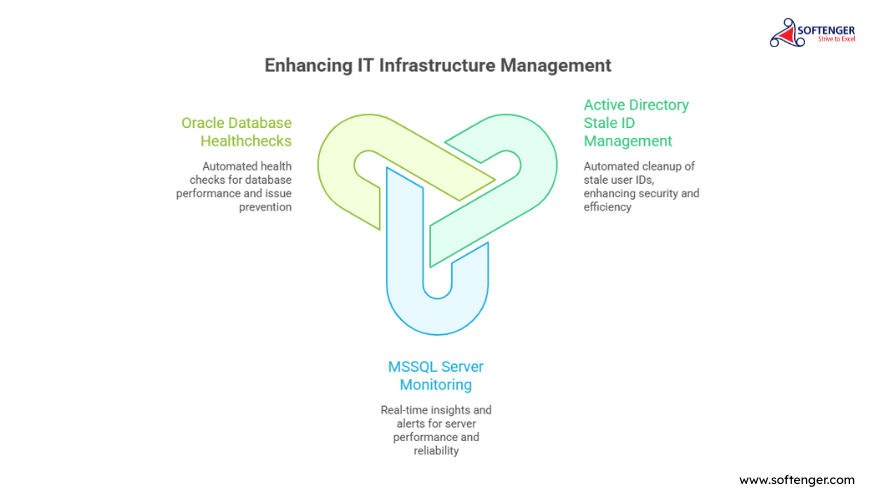
What the banking client had when all three modules went live
The outcomes map directly to the business need: manual processes eliminated, monitoring gaps closed, database health proactively managed. All three running continuously and in parallel.
Active Directory Security — Automated
- Stale user ID identification and cleanup automated — manual effort eliminated
- AD management processes streamlined — consistent account hygiene maintained on schedule
- Security posture improved through systematic dormant account removal
- Compliance-ready audit trail generated automatically with each run
MSSQL Monitoring — Real-Time
- Real-time insights and alerts deployed — proactive issue management enabled
- MSSQL Server performance and reliability improved through continuous visibility
- Issues identified at metric level before reaching application and user impact
- Reporting provides historical trending for capacity planning
Oracle Health — Daily & Consistent
- Automated daily healthcheck running before business hours — zero manual queries required
- Consistent monitoring across all Oracle instances in scope — no databases missed
- Database performance issues and errors surfaced in structured morning reports
- Proactive checks prevent overnight issues from becoming business-hours incidents
Key Takeaway
This project demonstrates Softenger’s expertise in developing and deploying comprehensive automation solutions for IT infrastructure management in high-stakes environments. By automating critical processes for Active Directory, MSSQL Server monitoring, and Oracle database healthchecks simultaneously, Softenger significantly enhanced operational efficiency, security, and system reliability for a banking client where manual process failures carry direct business and compliance consequences.
Every engagement follows the AOTS framework
The three-module automation program followed Softenger’s AOTS model from initial scoping to post-deployment validation. The Advise phase determined that all three modules needed to be built in parallel — not sequentially — because the banking client’s security, monitoring, and database health requirements were all active risks at the same time. Sequencing them would have left two risks unaddressed while the first was resolved.
The Transform phase — where all three modules were tested and deployed — required coordinated scheduling and integrated reporting so that the three automation programs operated as a cohesive system. The Support phase keeps all three running, alerting, and reporting consistently in the live banking environment.
Advise
Assessed all three manual process risks. Determined parallel build was required. Defined scope per module, scripting approach per technology, and integration requirements for reporting and scheduling.
All three module scopes defined. PowerShell for AD, Shell scripting for MSSQL and Oracle. Integrated scheduling and reporting design approved.
Optimize
Scripts developed and tested per module. AD queries validated against test accounts. MSSQL alert thresholds calibrated. Oracle healthcheck coverage confirmed against client’s database inventory.
All three module scripts developed and unit-tested. Alert thresholds calibrated. Report formats agreed and signed off.
Transform
All three modules deployed simultaneously. Scheduling coordinated. Integration testing confirmed modules operate without conflicts. First live runs validated — AD reports generated, MSSQL alerts firing correctly, Oracle healthchecks distributed.
All three automation modules live and running. First reports distributed. Banking IT team receiving consistent, automated outputs across all three systems.
Support
All three modules running in production. AD stale ID reviews scheduled and consistent. MSSQL monitoring continuous. Oracle healthchecks daily before business hours. Ongoing maintenance of scripts and thresholds as the environment evolves.
Three-module automation program sustained. Banking client’s IT team operating with automated security, monitoring, and health management — no manual intervention required.
The AOTS model is applied to every Softenger engagement
Advise, Optimize, Transform, Support — the same four-phase discipline structures every engagement, from banking automation programs to large-scale network changes, SOC operations, and IT infrastructure management.
Questions about banking IT automation
 IT Automation
24×7 IT Process Automation Support
Establishing a true 24×7 support system for a niche infrastructure automation product across global time zones — without building an internal round-the-clock engineering team.
 Network Change Mgmt
Large-Scale Network Configuration Change
Shell scripting automation used to reconfigure 2,000–3,000 Cisco routers across 100 physical sites PAN India — with standardized templates, monitoring scripts, and minimal downtime.
 IT Infrastructure
Streamlined Virtual Infrastructure
280+ VMware ESXi physical servers upgraded and aligned to vCenter 6.7 VCSA — version fragmentation eliminated, inventory integrity restored, monitoring systems realigned.
Tell us which manual processes you need automated first.
Whether it’s Active Directory account lifecycle management, database monitoring and healthchecks, server performance tracking, or any other repeating IT process that currently requires manual execution — Softenger builds automation that’s tailored to your technology stack and delivers from day one. A conversation with one of our automation specialists starts with the process, not the tool.
⚙️ Discuss an IT Automation Project
ISO 27001 certified. Your information is handled securely and never shared.